Book a call ↗

Construction · 5 min read · September 4, 2026

How to Connect Jobber to Your Own Dashboard Without Breaking the Office's Login

A contractor's dashboard reads its Jobber account every day. I almost broke that connection with one harmless looking test. Here is how Jobber's sign-in actually works, and the rules I now follow before touching a live connection.

How do I connect Jobber to my own dashboard without breaking anyone's login?

Give the connection one owner. Jobber issues a new refresh token each time the old one is used and cancels the old one, so every copy of the connection must read and save tokens from one shared store. Never test against the office's live connection with a script that keeps its own copy.

I built a dashboard for a renovation contractor that reads their Jobber account: jobs, quotes, invoices, what is overdue. It has run in production since the summer, and the person who signed it in is the one who runs the field, whose day is already full.

In early September I planned a quick test ping against that connection to prove a new piece of the build. While writing it up I read how Jobber handles its sign-in, and cancelled the test. It would have worked perfectly, and the dashboard would have been locked out until the field lead signed in again. I rewrote that part of the plan as four proofs that never call Jobber at all.

Why a Jobber test can log the office out

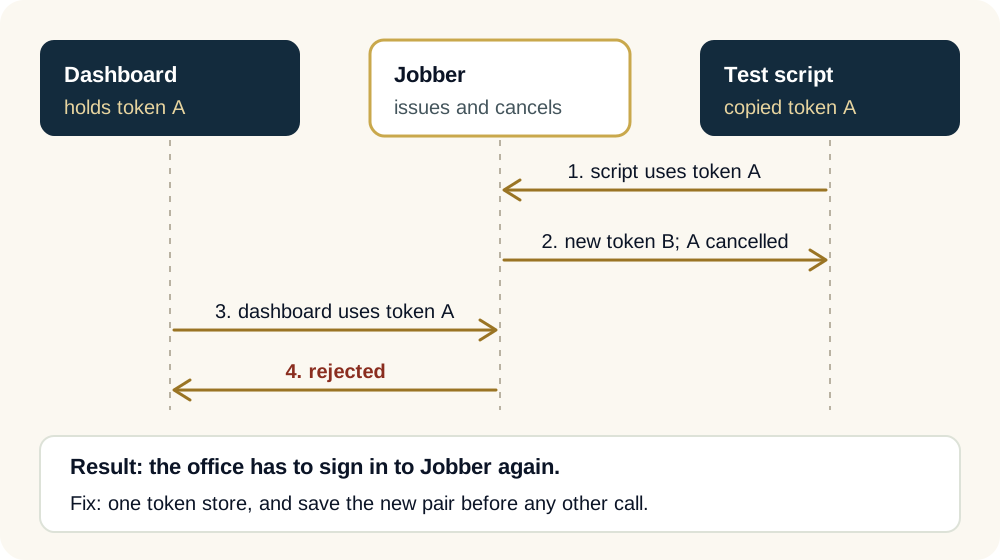
Jobber hands out a new refresh token every time the current one is used, and cancels the old one. A second copy of the connection that refreshes on its own leaves the first copy holding a dead token.

When an office connects an app to Jobber, the app receives two tokens. The access token opens the door for about an hour. The refresh token is how the app gets a new access token without asking a person to sign in again.

Jobber rotates the refresh token. Each time the app uses it, Jobber answers with a new one, and for apps created after January 2, 2024 the old one stops working immediately. That is a good security design, and the OAuth standard allows it: when the server issues a new refresh token, the client must throw the old one away.

The trap is a second copy. My test script would have loaded the stored refresh token, used it, received a new one and kept that to itself. The dashboard would still be holding the old token, now cancelled, and its next refresh would fail.

Diagram: the dashboard and a separate test script both start from the same refresh token. The script uses it first and receives a new token that only it keeps. The dashboard then tries the old token, Jobber rejects it, and the office has to sign in again.
Two copies of one connection. Whoever refreshes first keeps the only working token.

Keep one token store, and save before you call

Every part of the system reads the tokens from one place and writes the new pair back there before making any other call. A script with its own saved token is a second owner, and two owners break the chain.

Jobber's own guidance comes down to one habit: every time a refresh token is used, save both new tokens to your token store before making any other call. Then reload from that store; never trust a copy sitting in a variable from earlier.

In practice that means one owner. The dashboard, a nightly sync and any admin tool all read the tokens from the same database row and write the new pair back to it. A script on a laptop with its own saved token is a second owner, and two owners break the chain the first time both run.

Plan for the day it breaks anyway

If a refresh fails, the dashboard should say so on the screen and name who signs in again. Numbers that silently stop updating are worse than a clear message that the connection needs a person.

Even with one owner, a connection will eventually need a person: someone changes a password, an admin removes the app, or a token expires while the dashboard is switched off. The question is what the office sees when that happens.

The wrong answer is yesterday's numbers with no warning. The right one is a plain message at the top of the screen that the Jobber connection needs to be signed in again, when it last worked, and who in the office does it. A dashboard that is quietly stale is worse than one that says it is stale.

How I test now without touching the live connection

Proofs that read the code, stored records and saved sample responses, and no live call from a separate script. The office's connection is production and gets treated like it.

The office's Jobber connection is production, the same as a live website. So the proofs read the code that stores and reloads tokens, the stored records the dashboard already fetched, and sample responses saved to a file. None of them refreshes a token.

If a live call is truly needed, it goes through the dashboard's own token store, at a time the office knows about, with someone ready to sign in again if it goes wrong. What stays human is the sign-in itself: the office decides who connects the account, and nobody else signs in on its behalf.

When is this the wrong move? If the office only needs a weekly export, Jobber's own reports may be enough, and a live connection is one more thing to keep healthy. Build the connection when the dashboard needs data every day.

Common questions

Answers to what people ask.

Does Jobber have an API for custom dashboards?

Yes. Jobber publishes a developer platform with an OAuth sign-in, and an app you build can read jobs, quotes and invoices for an account that grants it access. Read its refresh token rotation page before writing any code that stores tokens.

Why did my Jobber integration stop working after a test?

The most common cause is two copies of the connection. A test script used the stored refresh token, received a new one, and kept it. The dashboard still holds the old token, which Jobber has already cancelled, so its next refresh fails and someone has to sign in again.

Can I turn off refresh token rotation?

Only during development. Jobber lets a developer switch it off while building, but it must be on for any app published in its marketplace, and turning it off does not fix code that keeps tokens in more than one place.

How should I test a live Jobber connection safely?

Mostly without calling it. Test the code that stores and reloads tokens, the code that reads each page of results and the screens that show them, using saved sample responses. Make a live call only through the same token store the dashboard uses.

Sources

Where this comes from.

Next step

Connecting Jobber to something of your own?

Bring the list of what you want to see every morning. We will tell you which parts need a live connection, and how it gets tested without logging your office out.

Christopher J. Moreno

Written by

Christopher J. Moreno

Chris Moreno builds custom AI systems for business operations. His writing draws on the work behind these systems: intake, follow-up, document workflows, and the checks that keep people in control.

Published September 4, 2026 · Connect on LinkedIn

Our methodology

The Flo OS in practice

The approach behind this work follows the four phases of Flo OS, our operating methodology for turning messy business workflows into systems that run cleanly and compound over time.

See how we work →

Related reading

Keep reading.

All articles